



Isabella Taylor, pictures provided by Julia Rockwell and Isabella Taylor
As a new college first-year student at Clemson University, there are a lot of things I wish I had known before coming in, especially about how to present myself online! Therefore, I have compiled a list of my favorite LinkedIn tips and tricks to help elevate your LinkedIn to the next level.
No.1 Headline
Arguably, the most important part of your online profile is your Headline. This is the first thing everyone sees once they visit your page, and there are multiple ways to organize it. One great way is from JobScan, in their How to Write Your LinkedIn Headline (With 20 Examples) article. Essentially, you order your Headline in this way:
[Current Role/Profession] | [Primary Skills/Areas of Expertise] | [Unique Value] | [Notable Achievement] | [Personal Passion or Career Goal]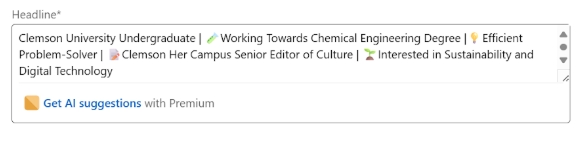
The image above is provided by Julia Rockwell, Julia Rockwell’s LinkedIn Headline using the Headline algorithm above, and some “popping” emojis.
For each section, you will also include an indicative emoji. This helps the reader mentally separate each area and includes a distinctive “pop!” to your profile.
No.2 Personal LinkedIn URL
If you plan to put your LinkedIn profile at the top of your resume, you’ll want a recognizable URL. Something that alerts employers that you know what you’re doing, and that you took the extra time to change something so seemingly small. In reality, your URL is the gateway to your LinkedIn profile, and if the link looks suspicious, people may be hesitant to click on it.

Image provided by Julia Rockwell, Julia Rockwell’s LinkedIn URL after customizing it to impress employers.
LinkedIn produced its own article on how to change your URL. The steps are a little in the weeds, so I would check out the article to get the specifics!
No.3 Professional Headshot
I know those senior photos must have looked nice, and that one time your family went to the beach, there was great lighting, but your LinkedIn Headshot should aim to be a professional photo taken in business casual attire. 

Left: Image provided by Isabella Taylor, Isabella Taylor’s Professional Headshot taken by the C-Suite. Right: Image provided by Julia Rockwell, Julia Rockwell’s Professional Headshot taken from Senior Year of High School.
At Clemson University, there are plenty of opportunities to have a professional headshot taken for free, especially at the C-Suite in The Wilbur O. and Ann Powers College of Business. If you’re not convinced a professional headshot is the way to go, read this article from the Wall Street Journal; it really lays everything out in detail!
No.4 About Me
The About Section is almost as important as your Headline. Unfortunately, nine times out of ten, employers are not going to read the entire thing; therefore, you need to get your most important bits out in the beginning. Here is a helpful article from YourDictionary I recommend that details how to order your About Section effectively.
The key points for your About are as follows:
- Based on your intended major, change the format of your About Section. Engineering Majors should lean towards bullet points, Finance Majors should lean towards paragraphs, etc.
 Image provided by Isabella Taylor, Isabella Taylor’s LinkedIn About Me Section after implementing some of these tips.
 - Make your first sentence a hook–something interesting about you that sets you apart from the rest.
- Use keywords within your industry! LinkedIn has an algorithm that identifies specific keywords when employers search for employees.
- Write in first-person. Only professional LinkedIn About Sections should be written in the third person.
- Break up your paragraphs, because no one wants to read a giant blob of words!
No.5 Experience
Even if you’re a Freshman with no relevant job experience, this is a very important section! It gives employers something to work with and allows you to post your relevant work, whether it’s in a job or as a volunteer camp counselor.
Here is a helpful article from Acciona that explains why it’s essential to include an Experience Section, even if you don’t have any experience yet. Employers want to know that you are actively seeking work, and the best way to demonstrate this is through your experience. Whether you are merely aspiring to work in a field or have shadowed someone with your intended job, the Experience Section is where all of that information should go.

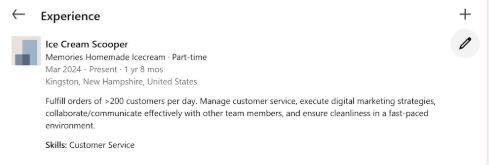
Images provided by Julia Rockwell, Julia Rockwell’s LinkedIn Experience Section, including all experience, not just work!
If you want any more LinkedIn help, I recommend taking a look at this PDF by the LinkedIn team!
All things considered, your LinkedIn might still look good and function alright without some of these tips. However, if you want your LinkedIn profile to look great and function at its highest capacity, I would highly recommend investing the time and effort to make it as effective as you want it to be! These tips and tricks are a great way to start.